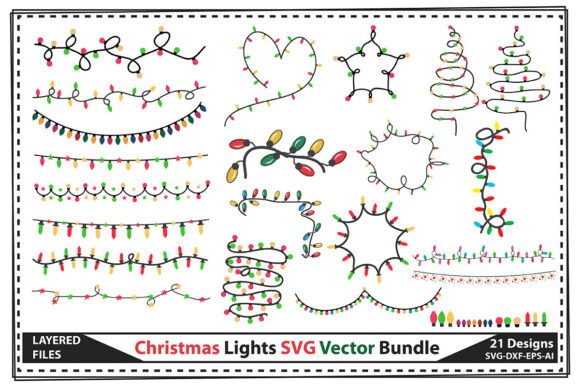
Christmas Lights SVG Vector Bundle: 21 Festive Design Elements
When the holiday season approaches, every designer and creative professional faces the same challenge: finding high-quality, versatile graphics that can adapt to countless projects without looking generic or overused. The Christmas Lights SVG Vector Bundle solves this problem elegantly with 21 isolated colorful graphic elements available in SVG, EPS, DXF, and AI formats. These aren't your typical flat, lifeless clipart pieces. Each light strand and bulb carries genuine warmth and personality, with subtle details that make them feel handcrafted rather than mass-produced.
What strikes me first about this collection is the color palette. The bundle doesn't rely on predictable red-and-green combinations alone. You'll find warm ambers, cool blues, soft pinks, and rich golds that work across modern and traditional aesthetics. The visual style sits comfortably between playful and polished—festive enough for family-oriented projects yet refined enough for commercial branding. The bulb shapes vary from classic round globes to elongated vintage styles, giving you genuine variety when assembling compositions.
Why Vector Format Changes Everything for Holiday Projects
Here's where the Christmas Lights SVG Vector Bundle becomes genuinely useful rather than just decorative. Because the EPS and AI files are true vectors, you can resize any element from a tiny favicon to a billboard without losing a single pixel of quality. Need those lights at 50% opacity for a subtle background texture? Done. Want to shift the color scheme from traditional multicolor to a monochromatic gold palette for a luxury brand campaign? Takes seconds in Illustrator or any compatible vector editor.
The SVG files are optimized specifically for Cricut machines, which means crafters and small business owners producing physical products can load these directly into Design Space without conversion headaches. Every file comes 100% layered, so individual bulbs, wires, and glow effects exist on separate layers. This matters enormously when you want to isolate a single element, recolor specific parts, or combine pieces from different strands into custom arrangements.
For anyone running a small business selling handmade goods, this level of control translates directly into efficiency. Instead of redrawing elements or paying a designer for custom modifications, you make the adjustments yourself in minutes. That practical flexibility is what separates genuinely useful design assets from decorative downloads that collect digital dust.
Real-World Applications Across Industries
The applications for these festive graphics extend well beyond obvious holiday cards. Let me walk through how different professionals actually use collections like the Christmas Lights SVG Vector Bundle in their day-to-day work.
Invitations and Event Design: Wedding planners and event coordinators hosting holiday galas, corporate Christmas parties, or New Year's celebrations need graphics that feel celebratory without being childish. These light elements work beautifully as border accents, header decorations, or scattered background elements on formal invitations. The layered structure lets you dial back the visual intensity by hiding certain layers or reducing opacity on glow effects.
Scrapbooking and Paper Crafting: The DXF format opens doors for die-cutting machines beyond Cricut, including Silhouette and Brother ScanNCut. Paper crafters can cut individual light bulbs from metallic cardstock, layer them with foam adhesive for dimension, and create genuinely tactile holiday layouts. The isolated nature of each element means you're not stuck with pre-arranged compositions—you choose exactly which pieces to include.
Vinyl Decals and Signage: Small business owners creating window displays, menu boards, or seasonal signage will find the clean vector paths cut smoothly on vinyl without jagged edges or problematic curves. A coffee shop owner could create a "Warm Drinks & Bright Lights" window decal in an afternoon, pairing these light elements with a complementary typeface for a cohesive seasonal brand moment.
Apparel and Product Design: T-shirt designers, mug creators, and print-on-demand entrepreneurs benefit from the scalability factor. A light strand illustration that looks crisp on a business card will look equally sharp printed across a tea towel or stretched across an art print. The Christmas Lights SVG Vector Bundle adapts to whatever substrate you're working with.
Working With Color and Composition
One practical observation worth sharing: these elements perform best when you resist the urge to use all 21 pieces simultaneously. Strong design relies on restraint. Select three to five complementary elements and give them breathing room. The warm glow effects baked into the illustrations already create visual interest—stacking too many strands together muddies that impact.
Consider how the light colors interact with your background. Dark navy or charcoal backgrounds make the bulbs pop dramatically, while cream or kraft-colored backgrounds create a vintage, nostalgic atmosphere. For social media graphics, test your compositions at actual display sizes. A light strand that looks balanced filling your screen might become an indistinguishable blob as an Instagram story sticker.
Font Pairing and Brand Integration
Typography choices matter when integrating these graphics into cohesive designs. The rounded, friendly shapes in most Christmas light illustrations pair naturally with sans serif fonts that share similar geometry. Think clean, modern typefaces with open letterforms rather than condensed or ultra-thin options. For more traditional or nostalgic projects, a warm serif font with moderate contrast creates elegant tension against the playful light elements.
If you're building a seasonal brand identity, establish a consistent system early. Choose your specific light elements, lock in two or three brand colors drawn from the bulb palette, select a primary and secondary typeface, and document those decisions. This consistency across touchpoints—from website banners to packaging inserts to email headers—builds recognition and signals professionalism.
Evaluating Commercial Use and Licensing
Before incorporating any design asset into commercial work, verify the licensing terms thoroughly. Understand whether the license covers physical products, digital goods, print-on-demand platforms, and client work. The Christmas Lights SVG Vector Bundle's multi-format delivery means you'll likely use different files for different workflows, so confirm that all included formats fall under the same usage terms.
Test your files across your specific tools before committing to a large project. Open the AI file in Illustrator, load the SVG into your cutting machine software, and check the EPS in whatever application your workflow relies on. Confirm that layers remain intact, colors display accurately, and paths cut cleanly. This five-minute verification step prevents frustrating surprises mid-project.
For designers and creators who need reliable, adaptable holiday graphics that work across digital and physical products, having a well-crafted vector collection ready to deploy saves considerable time and creative energy during the busiest season of the year.